


Welcome to Your New Online Banking Experience

Introducing POPA FCU's new Online Banking platform, designed to provide a more secure, convenient, and user-friendly online and mobile banking experience.

Before You Sign In

  • Current Online Banking users do not need to create a new account.
  • Simply sign in using your existing username and password and follow the registration prompts to complete your setup.
  • Verify your email address and phone number are up to date.

Mobile App Users

iPhone (iOS): If automatic updates are enabled, your POPA FCU Mobile App will update automatically. Or you may click the button below to download the latest version.

Android: Please download the latest version of the POPA FCU Mobile App from Google Play.

Need Assistance?

Our team is ready to help. Contact Member Services at (800) 369-7672, Monday – Friday from 8:30 AM to 4:30 PM or visit your nearest POPA FCU branch.

To access your new Online Banking, click Continue to Log In to proceed.

DIGITAL WALLET 

 Adding Cards to Your Digital Wallet is Getting Easier!

Overview

What is Digital Wallet?

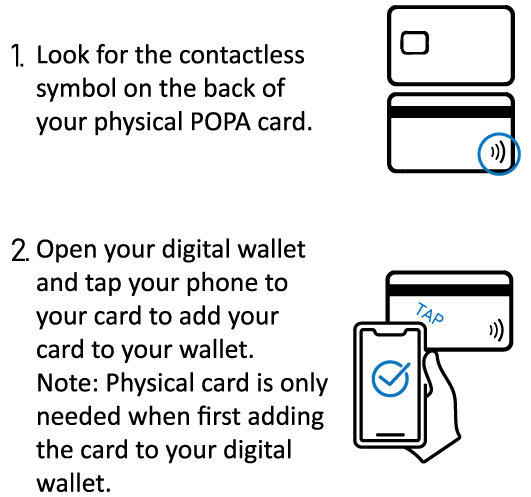
Adding your card is a wallet-enabled feature that lets you add your physical card to your mobile wallet by simply tapping your card on your phone – no manual typing in card details or taking a photo required.

* Adding debit cards to mobile wallets will require the physical card to be present and chip validated.


    How to Set Up Your Digital Wallet

    Look for the contactless symbol on the back of your physical POPA card. By having the Tap to Add feature, you will be able to add a card to your wallet, without entering the security code, quickly and seamlessly.

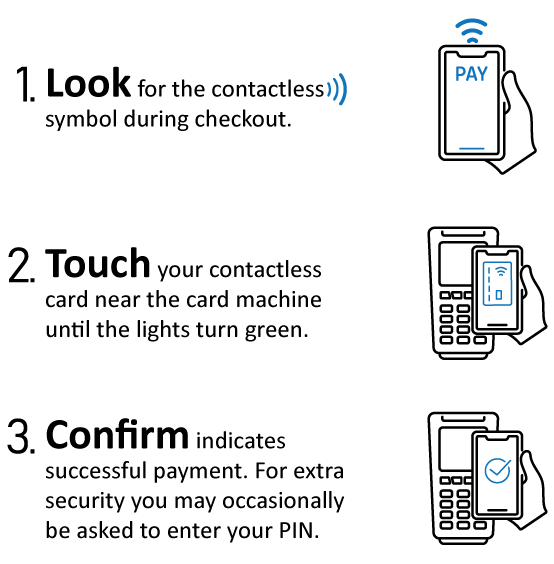
    How to Use your Digital Wallet 

    Related Topics

    Who is Eligible for POPA FCU Membership?

    Membership at POPA FCU gives you access to any of our convenient products and services, such as online banking, bill pay, direct deposit, and so much more. You also receive one vote during an election at our annual membership meeting.